<?xml version="1.0" encoding="utf-8"?><feed xmlns="http://www.w3.org/2005/Atom" ><generator uri="https://jekyllrb.com/" version="4.4.1">Jekyll</generator><link href="https://ichad.id/feed.xml" rel="self" type="application/atom+xml" /><link href="https://ichad.id/" rel="alternate" type="text/html" /><updated>2026-10-24T00:39:31+07:00</updated><id>https://ichad.id/feed.xml</id><title type="html">ichadhr</title><subtitle>Personal blog of ichadhr</subtitle><entry><title type="html">Browsing the Web with cookies disabled</title><link href="https://ichad.id/browsing-the-web-with-cookies-disabled.html" rel="alternate" type="text/html" title="Browsing the Web with cookies disabled" /><published>2016-05-28T00:00:00+07:00</published><updated>2016-05-28T00:00:00+07:00</updated><id>https://ichad.id/browsing-the-web-with-cookies-disabled</id><content type="html" xml:base="https://ichad.id/browsing-the-web-with-cookies-disabled.html"><![CDATA[<p>For more than a month now, I’ve been on a cookie diet: I’ve <strong>disabled all browser cookies</strong>.</p>

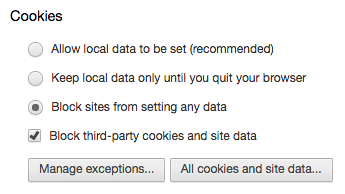
<figure>
  <img alt="Blocking cookies in Chrome" src="/images/cookie-blocking.png" /><br />
  <figcaption>No cookies for me anymore</figcaption>
</figure>

<h2 id="cant-login">Can’t login</h2>

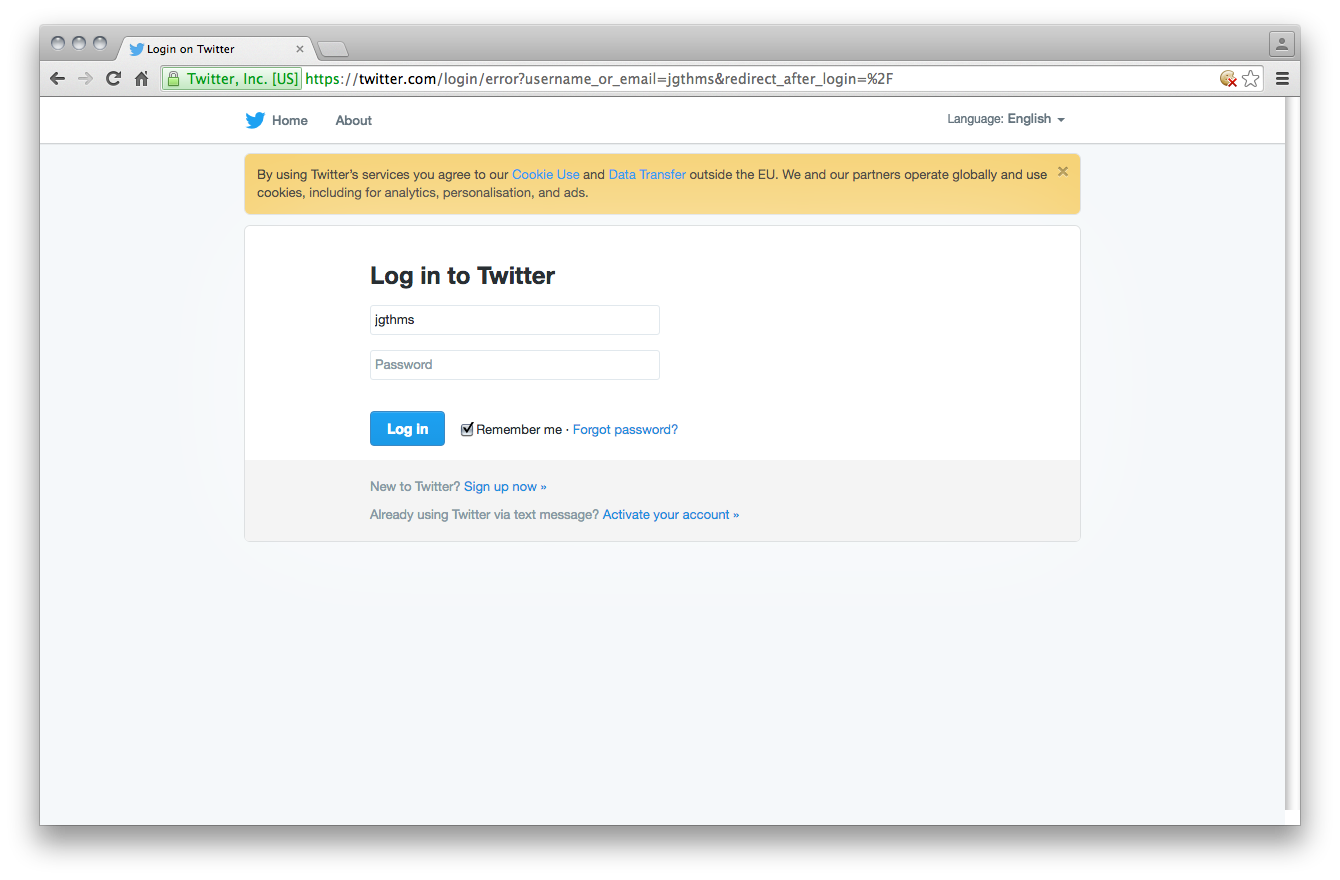
<p>The main issue is logging into any website, as Web authentication requires a cookie to be stored on the client’s computer.</p>

<figure>
  <img alt="Can't login to Twitter" src="/images/cookie-no-twitter-login.png" /><br />
  <figcaption>It's like an infinite login loop</figcaption>
</figure>

<h2 id="cant-interact">Can’t interact</h2>

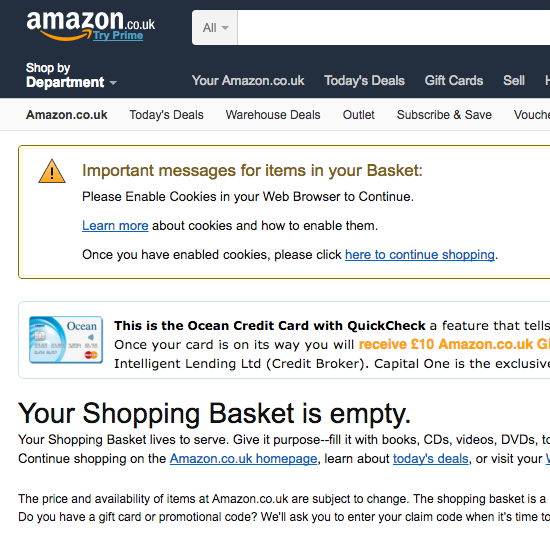
<p>Some basic interactions, like adding items to a cart, are not possible anymore.</p>

<figure>
  <img alt="Can't shop" src="/images/cookie-amazon-cant-shop.png" /><br />
  <figcaption>I saved a lot of money</figcaption>
</figure>

<h2 id="cant-even-browse-sometimes">Can’t even browse sometimes</h2>

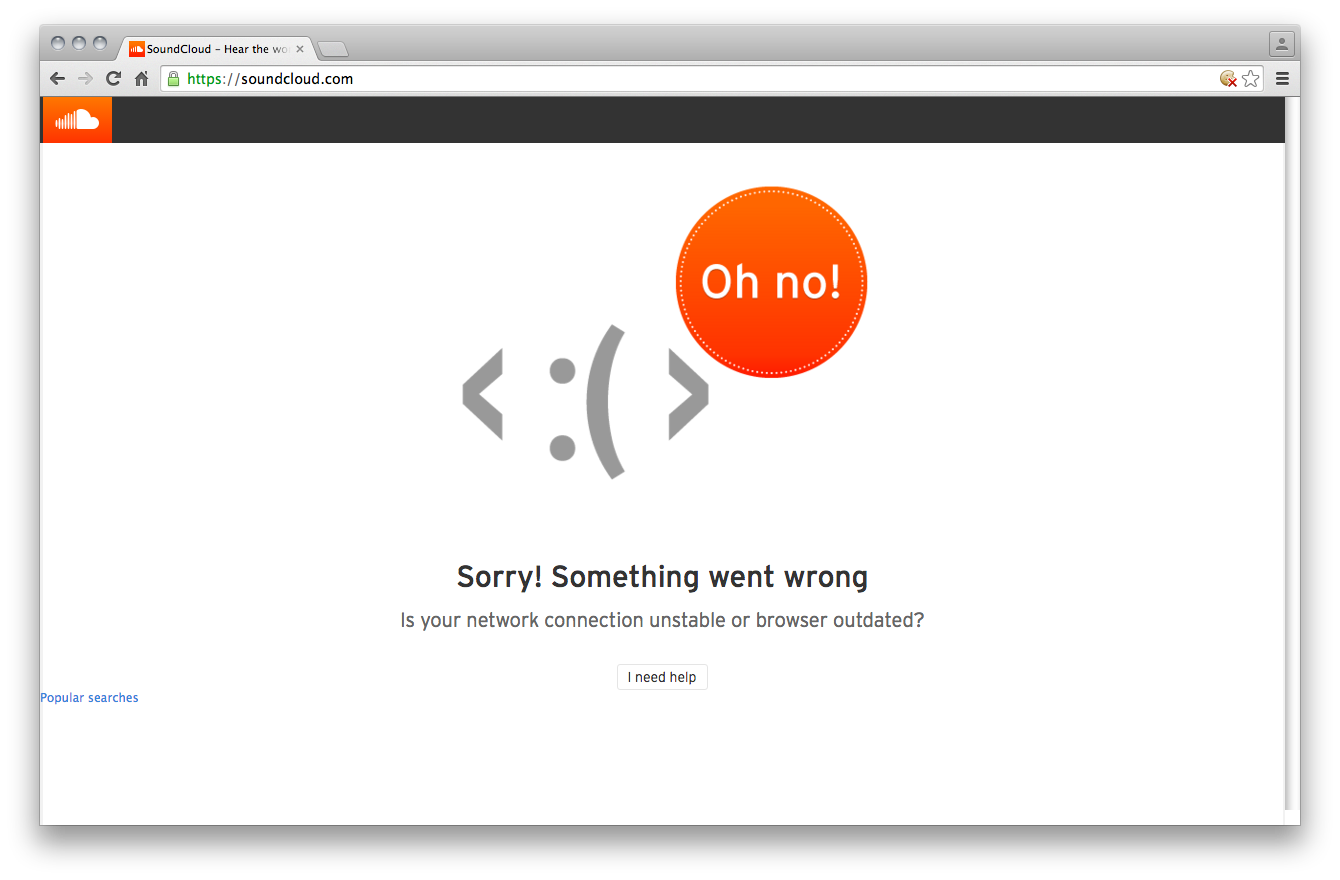
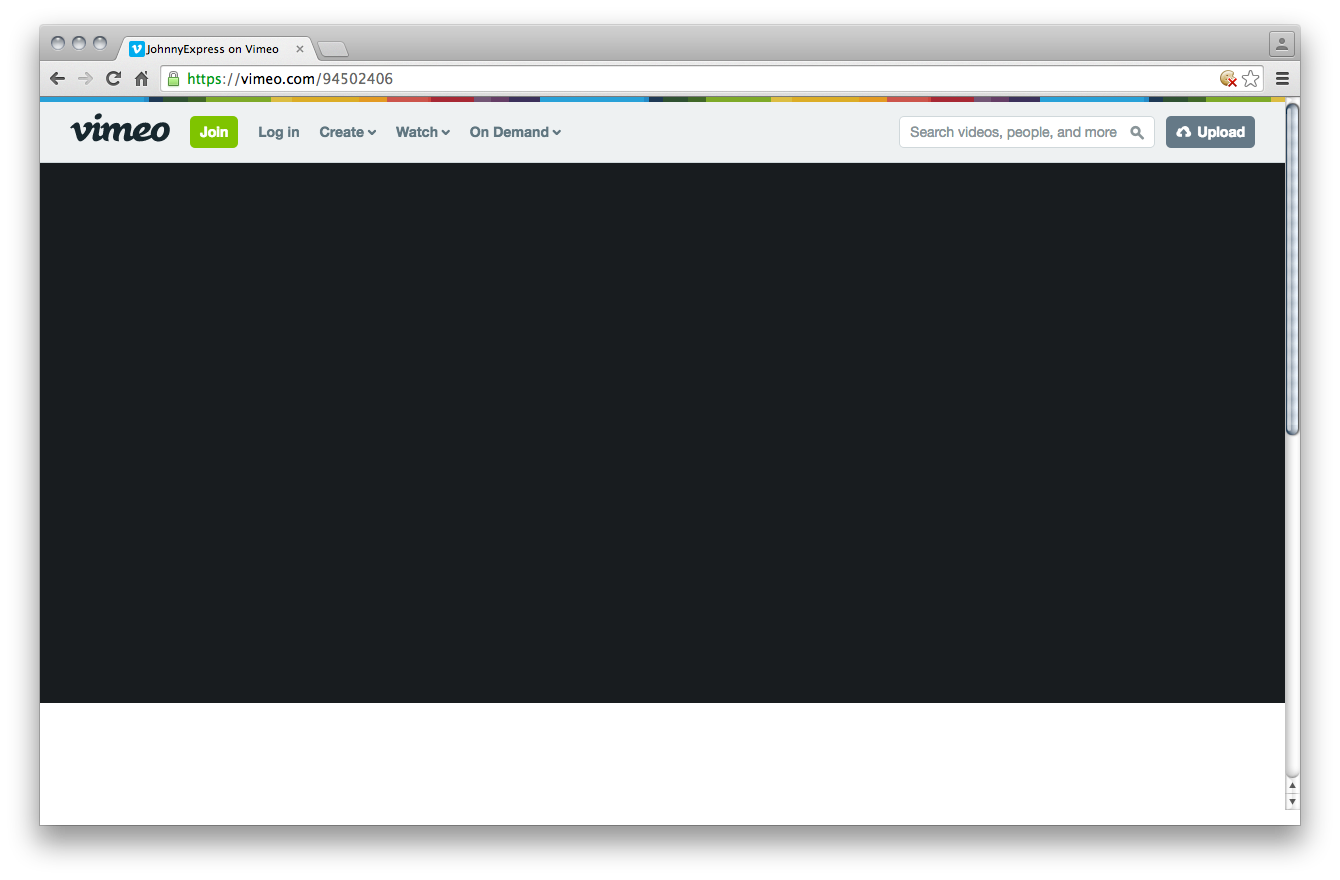
<p>Some website don’t even load, because a script tries but fails to access localStorage.</p>

<figure>
  <img alt="Can't listen to music" src="/images/cookie-soundcloud.png" /><br />
  <figcaption>MuteCloud, amirite?</figcaption>
</figure>

<figure>
  <img alt="Can't watch a video" src="/images/cookie-vimeo.png" /><br />
  <figcaption>The layout looks nice even with no content</figcaption>
</figure>

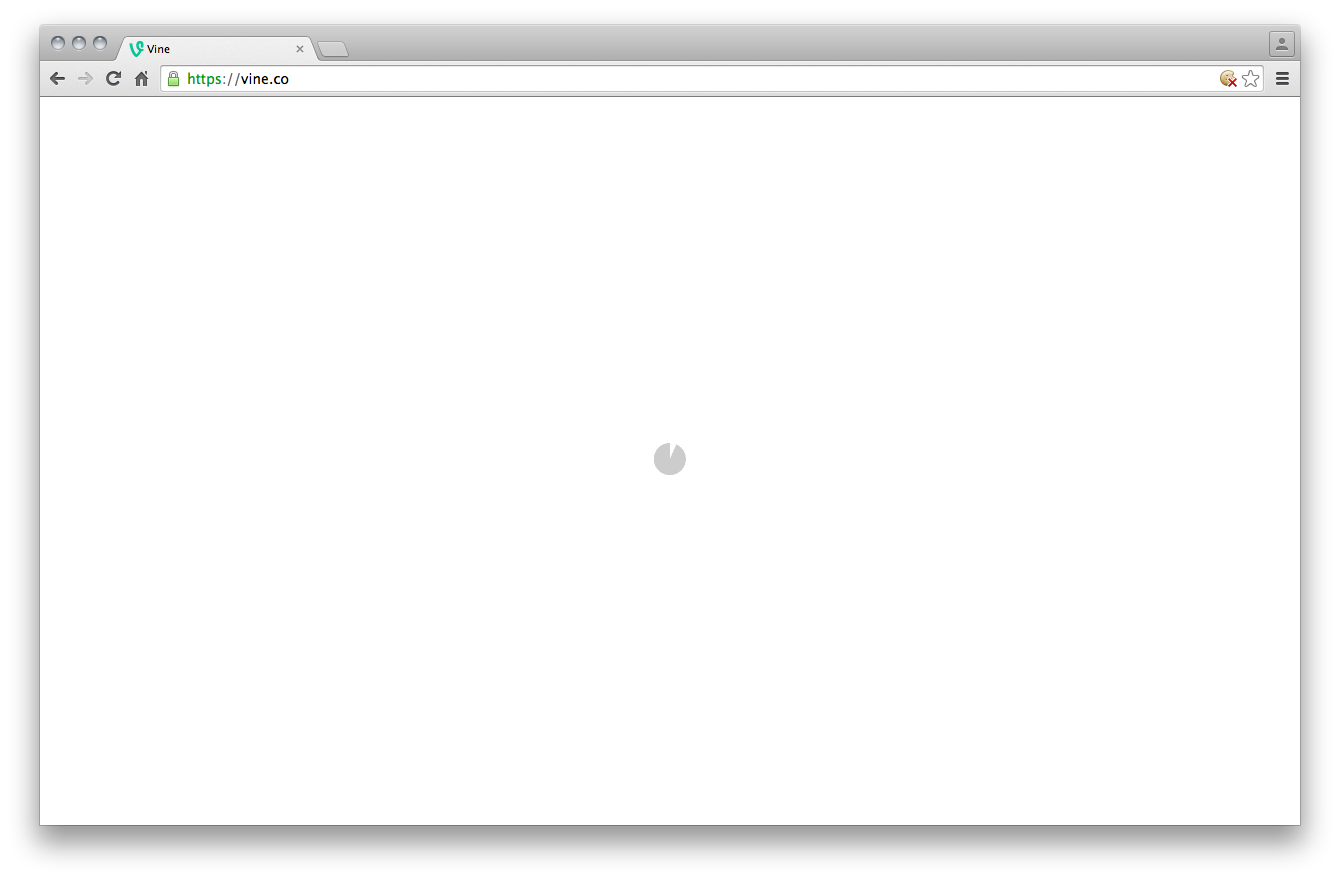
<figure>
  <img alt="Can't watch a vine" src="/images/cookie-vine.png" /><br />
  <figcaption>I waited more than 6 seconds, which defeats the whole purpose of watching the vine</figcaption>
</figure>

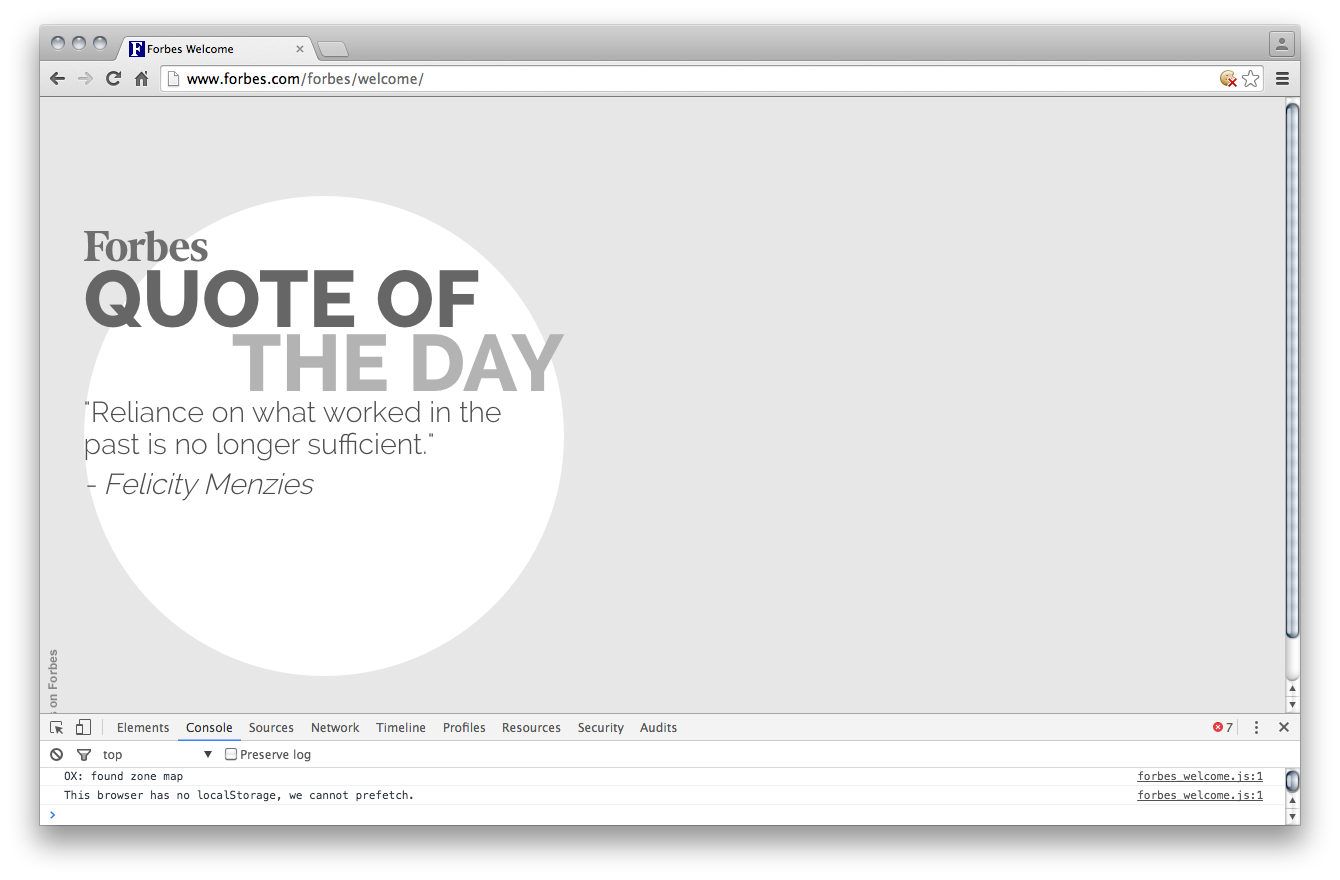
<p>I liked the <strong>Forbes</strong> one in particular.</p>

<blockquote>
  <p>This browser has no localStorage, we cannot prefetch.</p>
</blockquote>

<figure>
  <img alt="Can't read Forbes" src="/images/cookie-no-localstorage.png" /><br />
  <figcaption>I like how relevant the quote was</figcaption>
</figure>

<h2 id="can-gmail-without-google">Can GMail without Google</h2>

<p>Weirdly enough, by allowing the pattern <code class="language-plaintext highlighter-rouge">[*.]google.com</code>, I can log in to GMail <strong>without</strong> being automaticlly logged in to Google, YouTube, and Blogger.</p>

<h2 id="is-blocking-cookies-a-good-idea">Is blocking cookies a good idea?</h2>

<p>Honestly, it’s a <strong>pain</strong> to maintain.
By using a whitelist strategy, every time I encounter a login form, I need to manually add the domain pattern to the list of approved websites.
And when a website doesn’t load at all, I just don’t bother.</p>

<p>Do I feel less tracked and more secure? Of course!
/s</p>

<iframe width="640" height="360" src="https://www.youtube.com/embed/ZwzY1o_hB5Y" frameborder="0" allowfullscreen=""></iframe>]]></content><author><name></name></author><category term="Thoughts" /><summary type="html"><![CDATA[For more than a month now, I’ve been on a cookie diet: I’ve disabled all browser cookies.]]></summary></entry><entry><title type="html">The lost art of visited links</title><link href="https://ichad.id/the-lost-art-of-visited-links.html" rel="alternate" type="text/html" title="The lost art of visited links" /><published>2016-04-09T00:00:00+07:00</published><updated>2016-04-09T00:00:00+07:00</updated><id>https://ichad.id/the-lost-art-of-visited-links</id><content type="html" xml:base="https://ichad.id/the-lost-art-of-visited-links.html"><![CDATA[<p>There is a high chance that you’ve visited <a href="https://www.google.com">this page</a>, <a href="https://www.youtube.com">this other page</a>, and probably <a href="https://news.ycombinator.com">this one</a> as well. Probably not <a href="https://en.wikipedia.org/wiki/Driebruggen">this one</a> nor <a href="https://developer.mozilla.org/en/docs/Web/CSS/:visited">this one</a>, but I know for sure that you’ve been on <a href="/the-lost-art-of-visited-links.html">this one</a>.</p>

<p>To be fair, I can only <em>guess</em>. Whereas <em>you</em> can tell for sure, even without clicking or hovering any of these links, which ones you’ve already visited, because my website changes the colour of <strong>visited</strong> links.</p>

<h2 id="a-journey-through-time">A journey through time</h2>

<p>Browsing the Web is mainly <strong>two-dimensional</strong>: you either <em>scroll</em> (y-index) or <em>click</em> (z-index).</p>

<p>The colour of links provides a third dimension: <strong>time</strong>.</p>

<ul>
  <li>purple links are from the <strong>past</strong></li>
  <li>blue links are potential candidates for the <strong>present</strong> or <strong>future</strong></li>
</ul>

<p>Depending on what you’re looking for, the sight of visited links can trigger two different reactions:</p>

<ul>
  <li><em>“Ah yes, that’s the website I was looking for! I’ve already been there.”</em></li>
  <li><em>“I’ve already tried this webpage, let’s try the next.”</em></li>
</ul>

<h2 id="a-list-of-links-as-a-checklist">A list of links as a checklist</h2>

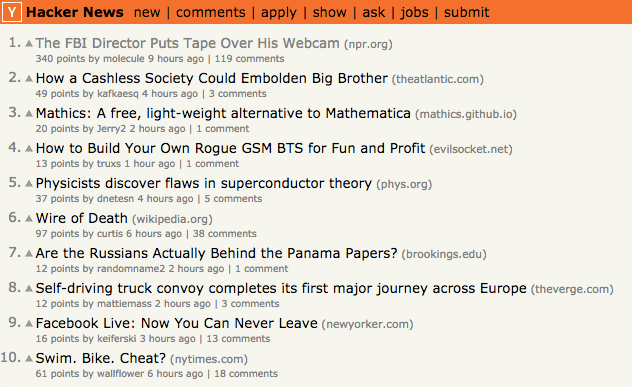
<p><strong>Link aggregators</strong> like <a href="https://www.reddit.com">Reddit</a> or <a href="https://news.ycombinator.com">Hacker News</a> are one of the few websites to still distinguish visited links from “new” ones.</p>

<figure>
  <img alt="Hacker News homepage" src="/images/hacker-news-homepage.png" />
  <figcaption>"Ah, lots of new content!"</figcaption>
</figure>

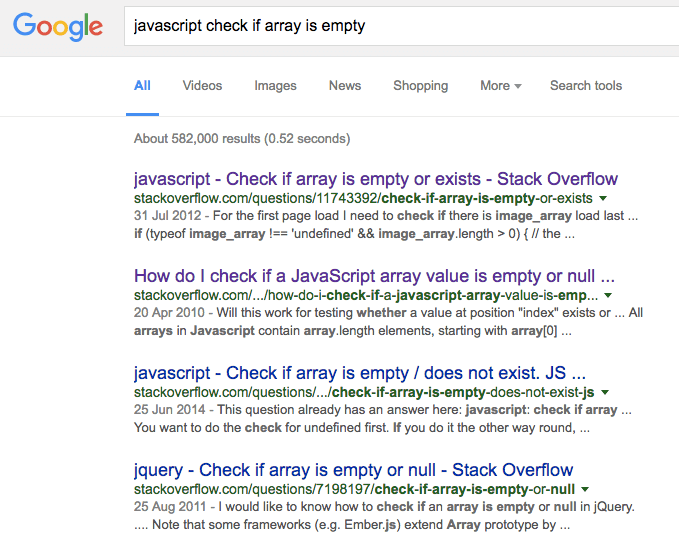
<p>Google <strong>search results</strong> are usually processed the same way. Let’s say you’re learning JavaScript and want to know how to check if an Array is empty.</p>

<figure>
  <img alt="Google search results for checking if an Array in JavaScript is empty" src="/images/google-visited-links.png" />
  <figcaption>The first two results weren't convincing, so let's check the third one now</figcaption>
</figure>

<p>Purple links are processed as <strong>completed tasks</strong> because:</p>

<ul>
  <li>you probably don’t want to see the same page <strong>twice</strong> in a row</li>
  <li>you want to <strong>resume</strong> your checklist where you left if off</li>
</ul>

<p>The colour distinction provides information about the state of the list.</p>

<h2 id="purple-links-eww">Purple links? Eww!</h2>

<p>But why are visited links so rare? Because designers (like me) are both <strong>lazy</strong> and <strong>picky</strong>.</p>

<p>When finalising a mockup (approved by either your ego or your client), you want the coded webpage to actually <em>match</em> that mockup. You wouldn’t want the user’s browsing history to <strong>affect</strong> your perfectly balanced design now, would you?</p>

<p>If you’re professional enough, you would design the button’s and input’s different states (default, hover, clicked, focused, disabled). But defining the <strong>visited</strong> state will never cross your mind.</p>

<p>This is one of the first CSS rules any designer writes:</p>

<figure class="highlight"><pre><code class="language-css" data-lang="css"><span class="nt">a</span> <span class="p">{</span>
  <span class="nl">color</span><span class="p">:</span> <span class="err">$</span><span class="n">anythingButBlue</span><span class="p">;</span>
<span class="p">}</span></code></pre></figure>

<p>This affects <strong>all</strong> links, in any state: hover, active, focus, and visited. It’s like a colour reset. You set it and forget it. You could use the <code class="language-plaintext highlighter-rouge">:link</code> pseudo-class but nobody knows about it. Plus, you’d forget to set <code class="language-plaintext highlighter-rouge">:visited</code> anyway.</p>

<p>A webpage is a <strong>living document</strong>: you design for different viewports, different environments, different interface states, different user interactions.</p>

<p><strong>Ignoring the colour of visited links is like caring about browser consistency: believing that every user experience should be strictly identical.</strong></p>

<h2 id="privacy-issue">Privacy issue</h2>

<p>A few years ago, someone ran an experiment: a website displaying links to the 1000 most visited websites. The website could potentially <strong>“steal”</strong> your browsing history by computing the <strong>colour</strong> of each link.</p>

<p>But browsers life Firefox <a href="https://developer.mozilla.org/en/docs/Web/CSS/:visited">prevent that kind of behaviour</a> now:</p>

<blockquote>
  <p>Though the color can be changed, the method getComputedStyle will <strong>lie</strong> and always give back the value of the non-visited color.</p>
</blockquote>

<p><em>(Emphasis mine)</em></p>

<p>As a result, styling visited links is very limited:</p>

<figure>
  <img alt="Visited links privacy" src="/images/visited-links-privacy.png" />
  <figcaption>You can only affect a visited link's colour</figcaption>
</figure>

<h2 id="not-all-links-are-equal">Not all links are equal</h2>

<p>Most links do <em>not</em> require a visited colour:</p>

<ul>
  <li><strong>navigation</strong> links (homepage, account, settings) that are <strong>repeatedly</strong> visited</li>
  <li><strong>interface</strong> links that alter the state of the page</li>
</ul>

<figure>
  <img alt="Hacker News nav" src="/images/hacker-news-nav.png" />
  <figcaption>These links should stay black</figcaption>
</figure>

<p>How do you decide which links should have a visited colour?</p>

<ul>
  <li><strong>external links</strong> because it provides the user information about a link you’re mentioning (which is why link aggregators <em>do</em> style visited links)</li>
  <li><strong>links to articles</strong> (or any page whose content remains <em>identical</em> over time)</li>
</ul>

<p>To explain, let’s say you’re browsing <a href="http://www.theguardian.com/uk">The Guardian</a>. The homepage is <strong>dynamic</strong> its content gets updated every few minutes. As a user, you don’t need to know you’ve visited the homepage because:</p>

<ul>
  <li>you probably <strong>already</strong> have</li>
  <li>you probably <strong>will</strong> again</li>
</ul>

<p>What you would like to know however, is which articles you’ve already read because an article’s content is <strong>very unlikely</strong> to have changed next time you visit it.</p>

<p>So knowing before clicking on article if you’ve already seen it will define your <strong>action</strong> depending on your <strong>intent</strong>:</p>

<table>
  <tbody>
    <tr>
      <th></th>
      <th style="color: blue;">Not visited yet</th>
      <th style="color: purple;">Already visited</th>
    </tr>
    <tr>
      <th>I want to see it</th>
      <td>
        <em>"New content!"</em>
        <br />
        <strong style="color: green;">Click!</strong>
      </td>
      <td>
        <em>"That's the article I was looking for!"</em>
        <br />
        <strong style="color: green;">Click!</strong>
      </td>
    </tr>
    <tr>
      <th>I don't want to see it</th>
      <td>
        <em>"That doesn't look interesting"</em>
        <br />
        <strong style="color: red;">Don't click!</strong>
      </td>
      <td>
        <em>"I've seen that already, it's not interesting"</em>
        <br />
        <strong style="color: red;">Don't click!</strong>
      </td>
    </tr>
  </tbody>
</table>

<p>Next time you design a website, think about <code class="language-plaintext highlighter-rouge">:visited</code>!<br />
The Web and its users will appreciate it.</p>]]></content><author><name></name></author><category term="UX" /><summary type="html"><![CDATA[There is a high chance that you’ve visited this page, this other page, and probably this one as well. Probably not this one nor this one, but I know for sure that you’ve been on this one.]]></summary></entry><entry><title type="html">A better Google AMP test</title><link href="https://ichad.id/a-better-google-amp-test-page.html" rel="alternate" type="text/html" title="A better Google AMP test" /><published>2016-03-19T00:00:00+07:00</published><updated>2016-03-19T00:00:00+07:00</updated><id>https://ichad.id/a-better-google-amp-test-page</id><content type="html" xml:base="https://ichad.id/a-better-google-amp-test-page.html"><![CDATA[<figure>
  <a href="https://www.ampproject.org/"><img alt="Google AMP logo" src="/images/google-amp-logo.png" /></a>
  <figcaption>Google AMP project</figcaption>
</figure>

<p>Last week on <a href="https://news.ycombinator.com/item?id=11287540">Hacker News</a>, a developer shared his Google AMP + Jekyll + Medium page that loads in 65 ms, and compared it with both React’s and Jekyll’s homepages. This seemed somehow irrelevant, considering the major differences between these 3 pages, in terms of design, technology, and purpose.</p>

<p>HN user inian <a href="https://news.ycombinator.com/item?id=11287694">commented</a>:</p>

<blockquote>
  <p>I feel a more apt comparison would have be comparing to a purely static page like a blog hosted on Github</p>
</blockquote>

<p>Hey! My blog is hosted on Github! And I tested out AMP 2 weeks ago.</p>

<p>Why not try to optimize my homepage: <a href="http://jgthms.com/">jgthms.com</a>?</p>

<p class="demo"><a href="http://jgthms.com/amp/">View result</a></p>

<h2 id="amp-in-a-nutshell">AMP in a nutshell</h2>

<p>What AMP provides is:</p>

<ul>
  <li><strong>loading</strong>: the JS library optimizes the loading of external resources</li>
  <li><strong>caching</strong>: all valid AMP documents can be cached on a Google CDN (which uses HTTP 2.0)</li>
</ul>

<p>How do you create a valid AMP page?</p>

<ol>
  <li>alter your <strong>HTML</strong> to match the AMP specifications</li>
  <li>inline your <strong>CSS</strong> in the page’s head</li>
  <li>include the AMP <strong>JS</strong> library</li>
</ol>

<h2 id="optimizing-my-homepage">Optimizing my homepage</h2>

<p>Yesterday, my homepage was still non-optimized:</p>

<ul>
  <li>the whole page was loaded</li>
  <li>the images weren’t compressed</li>
</ul>

<p>My page used to weigh <strong>2.2 MB</strong>. The three main images weighed 1.8 MB. That’s <strong>80%</strong> of the total weight. Clearly, there was room for improvement…</p>

<h3 id="classic-optimization-lazy-image-loading">Classic optimization: lazy image loading</h3>

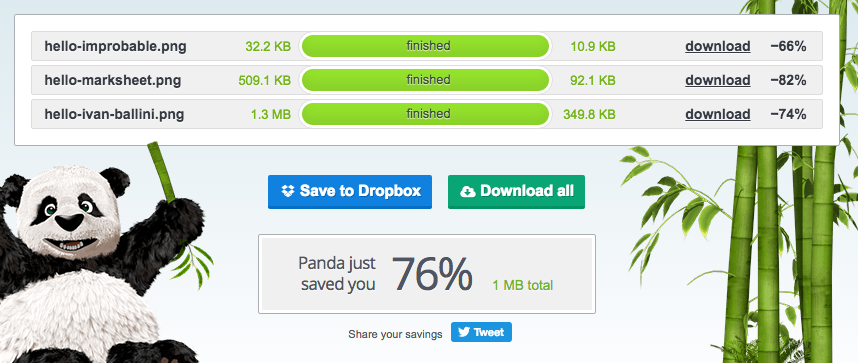
<p>I used the powerful <a href="https://tinypng.com">TinyPNG</a> to compress these images:</p>

<figure>
  <img alt="TinyPNG optimization" src="/images/tinypng-optimization.png" />
</figure>

<p>My page went from 2.2 MB to 858 KB.</p>

<p>I then applied <strong>lazy loading</strong>, using the <a href="https://github.com/eisbehr-/jquery.lazy">jquery.lazy</a> plugin, which allows images to be only fetched when they appear within the viewport.</p>

<p>This allows the last four images (375 KB, <strong>43%</strong> of the page weight) to be ignored during the initial page load.</p>

<h3 id="amp-optimization">AMP optimization</h3>

<p>AMP pages require a few alterations:</p>

<ul>
  <li>use <code class="language-plaintext highlighter-rouge">&lt;html ⚡&gt;</code></li>
  <li>add the AMP CSS with <code class="language-plaintext highlighter-rouge">&lt;style amp-boilerplate&gt;</code></li>
  <li>add the AMP JS with <code class="language-plaintext highlighter-rouge">&lt;script async src="https://cdn.ampproject.org/v0.js"&gt;&lt;/script&gt;</code></li>
  <li>add your own CSS inlined with <code class="language-plaintext highlighter-rouge">&lt;style amp-custom&gt;</code></li>
  <li><code class="language-plaintext highlighter-rouge">img</code> become <code class="language-plaintext highlighter-rouge">amp-img</code> elements</li>
  <li>images require both <code class="language-plaintext highlighter-rouge">width</code> and <code class="language-plaintext highlighter-rouge">height</code> attributes (to define the <strong>ratio</strong> only)</li>
</ul>

<figure class="highlight"><pre><code class="language-html" data-lang="html"><span class="nt">&lt;style </span><span class="na">amp-boilerplate</span><span class="nt">&gt;body</span><span class="p">{</span><span class="nl">-webkit-animation</span><span class="p">:</span><span class="o">-</span><span class="n">amp-start</span> <span class="m">8s</span> <span class="nf">steps</span><span class="p">(</span><span class="m">1</span><span class="p">,</span><span class="nb">end</span><span class="p">)</span> <span class="m">0s</span> <span class="m">1</span> <span class="nb">normal</span> <span class="nb">both</span><span class="p">;</span><span class="nl">-moz-animation</span><span class="p">:</span><span class="o">-</span><span class="n">amp-start</span> <span class="m">8s</span> <span class="nf">steps</span><span class="p">(</span><span class="m">1</span><span class="p">,</span><span class="nb">end</span><span class="p">)</span> <span class="m">0s</span> <span class="m">1</span> <span class="nb">normal</span> <span class="nb">both</span><span class="p">;</span><span class="nl">-ms-animation</span><span class="p">:</span><span class="o">-</span><span class="n">amp-start</span> <span class="m">8s</span> <span class="nf">steps</span><span class="p">(</span><span class="m">1</span><span class="p">,</span><span class="nb">end</span><span class="p">)</span> <span class="m">0s</span> <span class="m">1</span> <span class="nb">normal</span> <span class="nb">both</span><span class="p">;</span><span class="nl">animation</span><span class="p">:</span><span class="o">-</span><span class="n">amp-start</span> <span class="m">8s</span> <span class="nf">steps</span><span class="p">(</span><span class="m">1</span><span class="p">,</span><span class="nb">end</span><span class="p">)</span> <span class="m">0s</span> <span class="m">1</span> <span class="nb">normal</span> <span class="nb">both</span><span class="p">}</span><span class="k">@-webkit-keyframes</span> <span class="o">-</span><span class="n">amp-start</span><span class="p">{</span><span class="nt">from</span><span class="p">{</span><span class="nl">visibility</span><span class="p">:</span><span class="nb">hidden</span><span class="p">}</span><span class="nt">to</span><span class="p">{</span><span class="nl">visibility</span><span class="p">:</span><span class="nb">visible</span><span class="p">}}</span><span class="k">@-moz-keyframes</span> <span class="o">-</span><span class="n">amp-start</span><span class="p">{</span><span class="nt">from</span><span class="p">{</span><span class="nl">visibility</span><span class="p">:</span><span class="nb">hidden</span><span class="p">}</span><span class="nt">to</span><span class="p">{</span><span class="nl">visibility</span><span class="p">:</span><span class="nb">visible</span><span class="p">}}</span><span class="k">@-ms-keyframes</span> <span class="o">-</span><span class="n">amp-start</span><span class="p">{</span><span class="nt">from</span><span class="p">{</span><span class="nl">visibility</span><span class="p">:</span><span class="nb">hidden</span><span class="p">}</span><span class="nt">to</span><span class="p">{</span><span class="nl">visibility</span><span class="p">:</span><span class="nb">visible</span><span class="p">}}</span><span class="k">@-o-keyframes</span> <span class="o">-</span><span class="n">amp-start</span><span class="p">{</span><span class="nt">from</span><span class="p">{</span><span class="nl">visibility</span><span class="p">:</span><span class="nb">hidden</span><span class="p">}</span><span class="nt">to</span><span class="p">{</span><span class="nl">visibility</span><span class="p">:</span><span class="nb">visible</span><span class="p">}}</span><span class="k">@keyframes</span> <span class="o">-</span><span class="n">amp-start</span><span class="p">{</span><span class="nt">from</span><span class="p">{</span><span class="nl">visibility</span><span class="p">:</span><span class="nb">hidden</span><span class="p">}</span><span class="nt">to</span><span class="p">{</span><span class="nl">visibility</span><span class="p">:</span><span class="nb">visible</span><span class="p">}}</span><span class="nt">&lt;/style&gt;&lt;noscript&gt;&lt;style </span><span class="na">amp-boilerplate</span><span class="nt">&gt;body</span><span class="p">{</span><span class="nl">-webkit-animation</span><span class="p">:</span><span class="nb">none</span><span class="p">;</span><span class="nl">-moz-animation</span><span class="p">:</span><span class="nb">none</span><span class="p">;</span><span class="nl">-ms-animation</span><span class="p">:</span><span class="nb">none</span><span class="p">;</span><span class="nl">animation</span><span class="p">:</span><span class="nb">none</span><span class="p">}</span><span class="nt">&lt;/style&gt;&lt;/noscript&gt;</span>
<span class="nt">&lt;script </span><span class="na">async</span> <span class="na">src=</span><span class="s">"https://cdn.ampproject.org/v0.js"</span><span class="nt">&gt;&lt;/script&gt;</span>
<span class="nt">&lt;link</span> <span class="na">href=</span><span class="s">"https://fonts.googleapis.com/css?family=Karla:400,400italic,700,700italic"</span> <span class="na">rel=</span><span class="s">"stylesheet"</span> <span class="na">type=</span><span class="s">"text/css"</span><span class="nt">&gt;</span>
<span class="nt">&lt;link</span> <span class="na">rel=</span><span class="s">"stylesheet"</span> <span class="na">href=</span><span class="s">"https://maxcdn.bootstrapcdn.com/font-awesome/4.4.0/css/font-awesome.min.css"</span><span class="nt">&gt;</span>
<span class="nt">&lt;style </span><span class="na">amp-custom</span><span class="nt">&gt;</span><span class="p">{</span><span class="err">#</span> <span class="err">capture</span> <span class="err">include_to_sassify</span> <span class="err">#</span><span class="p">}{</span><span class="err">#</span> <span class="err">include</span> <span class="err">amp.sass</span> <span class="err">#</span><span class="p">}{</span><span class="err">#</span> <span class="err">endcapture</span> <span class="err">#</span><span class="p">}</span>
  <span class="p">{</span><span class="err">#</span> <span class="err">include_to_sassify</span> <span class="err">|</span> <span class="err">sassify</span> <span class="err">#</span><span class="p">}</span><span class="nt">&lt;/style&gt;</span></code></pre></figure>

<aside>I had to remove the percentage signs, otherwise Liquid would throw an error.</aside>

<h2 id="results">Results</h2>

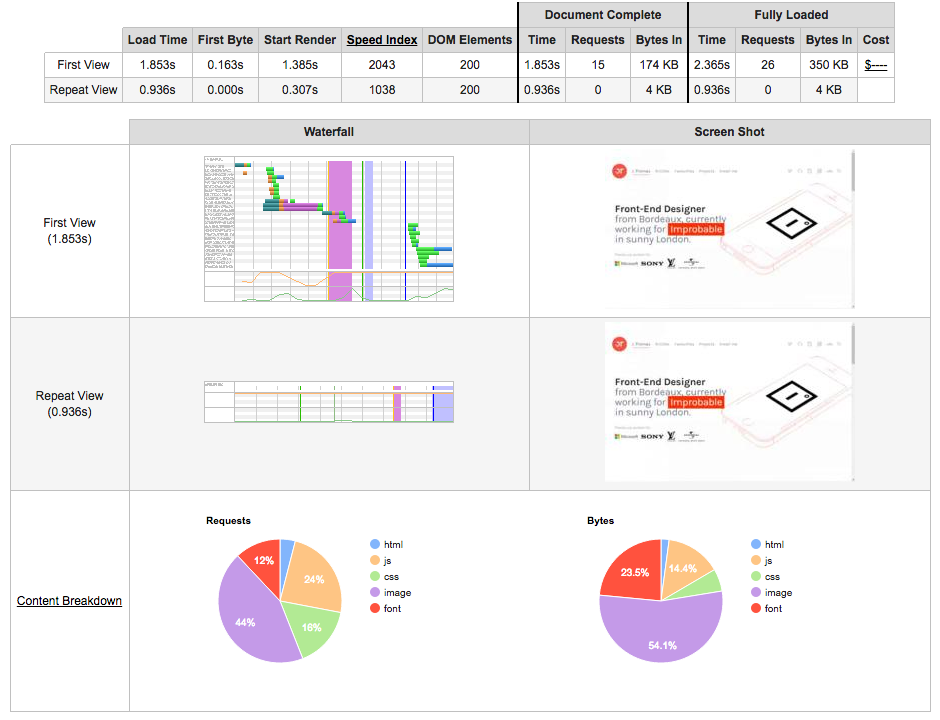
<figure>
  <a href="http://www.webpagetest.org/result/160319_80_PZ9/"><img alt="Chrome console screenshot" src="/images/test-jgthms.png" /></a>
  <figcaption>Classic optimization (lazy loading)</figcaption>
</figure>

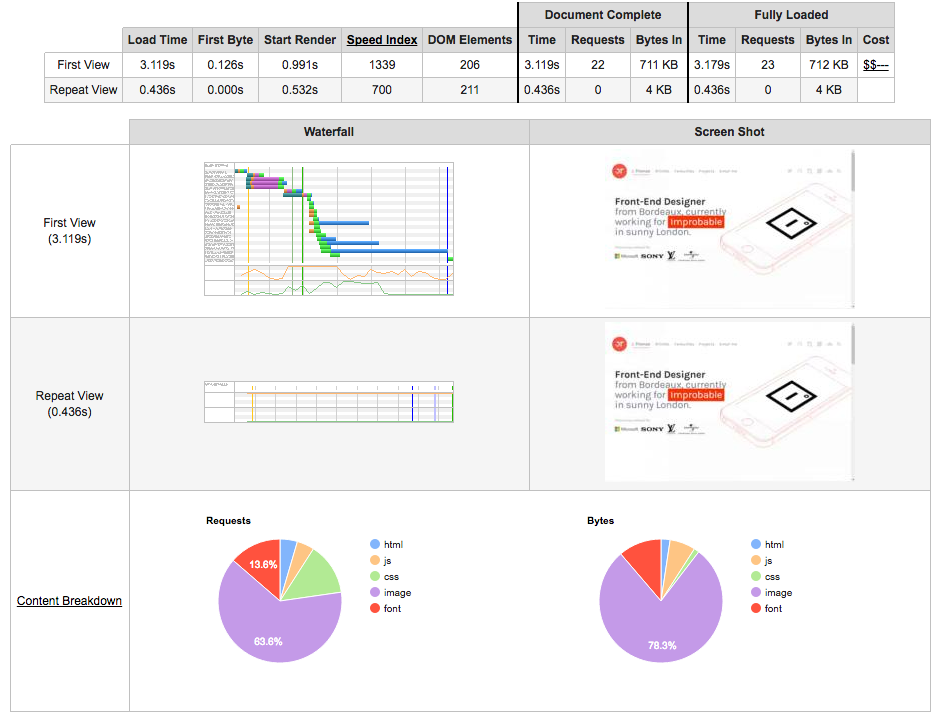
<figure>
  <a href="http://www.webpagetest.org/result/160319_FD_PZH/"><img alt="Chrome console screenshot" src="/images/test-amp.png" /></a>
  <figcaption>AMP optimization</figcaption>
</figure>

<table>
  <thead>
    <tr>
      <th></th>
      <th style="width: 28%;">Non-optimized</th>
      <th style="width: 28%;">Lazy loading</th>
      <th style="width: 28%;">AMP</th>
    </tr>
  </thead>
  <tbody>
    <tr>
      <th>Requests</th>
      <td>25</td>
      <td>22</td>
      <td>19</td>
    </tr>
    <tr>
      <th>Size</th>
      <td><span style="color: #ed6c63;">2,200 KB</span></td>
      <td><strong style="color: #97cd76;">312 KB</strong></td>
      <td>664 KB</td>
    </tr>
    <tr>
      <th colspan="4" style="font-size: 20px; text-align: center;">First view</th>
    </tr>
    <tr>
      <th>Document Complete</th>
      <td>-</td>
      <td><strong style="color: #97cd76;">1.853s</strong></td>
      <td>3.119s</td>
    </tr>
    <tr>
      <th><a href="https://sites.google.com/a/webpagetest.org/docs/using-webpagetest/metrics/speed-index">Speed Index</a></th>
      <td>-</td>
      <td>2043</td>
      <td><strong style="color: #97cd76;">1339</strong></td>
    </tr>
    <tr>
      <th>Fully Loaded</th>
      <td>-</td>
      <td><strong style="color: #97cd76;">2.365s</strong></td>
      <td>3.179s</td>
    </tr>
    <tr>
      <th colspan="4" style="font-size: 20px; text-align: center;">Repeat view</th>
    </tr>
    <tr>
      <th>Document Complete</th>
      <td>-</td>
      <td>0.936s</td>
      <td><strong style="color: #97cd76;">0.436s</strong></td>
    </tr>
    <tr>
      <th>Speed Index</th>
      <td>-</td>
      <td>1038</td>
      <td><strong style="color: #97cd76;">700</strong></td>
    </tr>
    <tr>
      <th>Fully Loaded</th>
      <td>-</td>
      <td>0.936s</td>
      <td><strong style="color: #97cd76;">0.436s</strong></td>
    </tr>
  </tbody>
</table>

<h2 id="conclusion">Conclusion</h2>

<p>I’m not sure if AMP is designed to optimize simple pages like mine but it’s worth a try. The main gain was essentially decreasing the page size.</p>

<p>If you’re trying to optimize your website for <strong>mobile</strong> users:</p>

<ul>
  <li>focus on <strong>page weight</strong>: nothing beats a page that only weighs a couple of hundreds of KB</li>
  <li>avoid <strong>animations</strong>: ever tried <a href="http://i.imgur.com/Oq0MjFs.png">pull-to-refresh</a> on twitter? Slowest interaction I’ve ever seen in a mobile browser.</li>
  <li><strong>lazy load</strong> your images: it’s so easy to set up, and the initial load above the fold will be greatly improved</li>
</ul>

<p>Obviously, most websites are not as simple as a static blog with only a few articles and only updated once in a while. Different platforms that serve different purposes require different strategies.</p>

<p>But even a mobile browser only expects HTML, CSS, and JS. And considering the screen size, a phone can only render a small part of a page at once. And if you don’t focus on that initial rendering, the user might wonder why he had to wait 10 seconds to only see a tiny logo, a huge navbar that covers half of the page, and three lines of text.</p>

<p>So ask yourself if loading 1 MB images (like I did) or a JavaScript framework client-side (like others do) is worth infuriating your visitors.</p>]]></content><author><name></name></author><category term="Thoughts" /><summary type="html"><![CDATA[Google AMP project]]></summary></entry><entry><title type="html">25 signs you’re a professional designer</title><link href="https://ichad.id/25-signs-youre-a-professional-designer.html" rel="alternate" type="text/html" title="25 signs you’re a professional designer" /><published>2015-12-07T00:00:00+07:00</published><updated>2015-12-07T00:00:00+07:00</updated><id>https://ichad.id/25-signs-youre-a-professional-designer</id><content type="html" xml:base="https://ichad.id/25-signs-youre-a-professional-designer.html"><![CDATA[<ol>
  <li>You once spent 2 hours on a drop shadow</li>
  <li>You added “Ruby” to your CV because you once scaffolded a Rails project</li>
  <li>You mention either coffee, music, pixels or veganism in your Twitter profile</li>
  <li>You describe your design as being “centered on the user” although you’ve never met one</li>
  <li>You have an animated desktop background</li>
  <li>You ask people to please press the “L” button</li>
  <li>You once redesigned Facebook by removing all the ads and increasing the whitespace by 300%</li>
  <li>You added “PHP” to your skill set because you managed to add a custom post type in WordPress</li>
  <li>You love flat design because you’re lazy and don’t want to deal with bloody gradients anymore</li>
  <li>You provide fellow designers constructive feedback by saying “Nice!” “Love this &lt;3” and “Good work :)”</li>
  <li>You think “Information Density” is a scientific magazine</li>
  <li>You can create a brand identity by choosing a typeface and 4 different colours</li>
  <li>You will criticize an app because it looks ugly, although you’ve never used it or aren’t even in the target market</li>
  <li>You think Hacker News is a forum for cyber criminals</li>
  <li>Your favourite Spotify playlist is “Afternoon Acoustic”</li>
  <li>You claim to be an “UX Expert” although you never conducted any user study</li>
  <li>You always add a weather icon in the dashboards you design</li>
  <li>You wonder why visitors can’t read your website, although the ultra thin font you picked looked perfect on your 15” Retina MacBook Pro</li>
  <li>You added “Mobile Interaction Designer” to your description because you once designed a login screen in Photoshop</li>
  <li>You think SVN is a sports channel</li>
  <li>You tag all your portfolio projects with “Work In Progress”</li>
  <li>You wonder why your design doesn’t look as good with real data</li>
  <li>You added “Front End Development” to your CV because you managed to customize a Bootstrap theme</li>
  <li>You include animations in all your designs because you want to please recurrent users</li>
  <li>You think “Above the fold” is an indie rock band</li>
</ol>]]></content><author><name></name></author><category term="Thoughts" /><summary type="html"><![CDATA[You once spent 2 hours on a drop shadow You added “Ruby” to your CV because you once scaffolded a Rails project You mention either coffee, music, pixels or veganism in your Twitter profile You describe your design as being “centered on the user” although you’ve never met one You have an animated desktop background You ask people to please press the “L” button You once redesigned Facebook by removing all the ads and increasing the whitespace by 300% You added “PHP” to your skill set because you managed to add a custom post type in WordPress You love flat design because you’re lazy and don’t want to deal with bloody gradients anymore You provide fellow designers constructive feedback by saying “Nice!” “Love this &lt;3” and “Good work :)” You think “Information Density” is a scientific magazine You can create a brand identity by choosing a typeface and 4 different colours You will criticize an app because it looks ugly, although you’ve never used it or aren’t even in the target market You think Hacker News is a forum for cyber criminals Your favourite Spotify playlist is “Afternoon Acoustic” You claim to be an “UX Expert” although you never conducted any user study You always add a weather icon in the dashboards you design You wonder why visitors can’t read your website, although the ultra thin font you picked looked perfect on your 15” Retina MacBook Pro You added “Mobile Interaction Designer” to your description because you once designed a login screen in Photoshop You think SVN is a sports channel You tag all your portfolio projects with “Work In Progress” You wonder why your design doesn’t look as good with real data You added “Front End Development” to your CV because you managed to customize a Bootstrap theme You include animations in all your designs because you want to please recurrent users You think “Above the fold” is an indie rock band]]></summary></entry><entry><title type="html">In CSS: use pixels, not em</title><link href="https://ichad.id/in-css-use-pixels-not-em.html" rel="alternate" type="text/html" title="In CSS: use pixels, not em" /><published>2015-10-25T00:00:00+07:00</published><updated>2015-10-25T00:00:00+07:00</updated><id>https://ichad.id/in-css-use-pixels-not-em</id><content type="html" xml:base="https://ichad.id/in-css-use-pixels-not-em.html"><![CDATA[<p>CSS provides several <a href="http://marksheet.io/css-size-units.html">size units</a>:</p>

<ul>
  <li><code class="language-plaintext highlighter-rouge">px</code> pixels</li>
  <li><code class="language-plaintext highlighter-rouge">%</code> percentages</li>
  <li><code class="language-plaintext highlighter-rouge">em</code> relative to the font size</li>
  <li><code class="language-plaintext highlighter-rouge">rem</code> relative to the <em>root</em> font size</li>
  <li>even unitless values (for <code class="language-plaintext highlighter-rouge">line-height</code>)</li>
</ul>

<p>The most natural unit to use is <strong>pixels</strong>, especially for defining <code class="language-plaintext highlighter-rouge">height</code> and <code class="language-plaintext highlighter-rouge">width</code>, as it’s an <strong>absolute</strong> unit.</p>

<p>But <strong>relative</strong> units, like <code class="language-plaintext highlighter-rouge">em</code>, have their benefits as well.</p>

<h2 id="how-em-works">How em works</h2>

<p><code class="language-plaintext highlighter-rouge">em</code> is relative to the <em>current</em> <code class="language-plaintext highlighter-rouge">font-size</code> value. So if your element has <code class="language-plaintext highlighter-rouge">font-size: 12px</code>, <code class="language-plaintext highlighter-rouge">1em</code> equals <code class="language-plaintext highlighter-rouge">12px</code>.</p>

<p>By defining your <code class="language-plaintext highlighter-rouge">font-size</code>, you can use <code class="language-plaintext highlighter-rouge">em</code> to define <em>relative</em> values for <em>other</em> properties:</p>

<ul>
  <li><code class="language-plaintext highlighter-rouge">margin</code></li>
  <li><code class="language-plaintext highlighter-rouge">padding</code></li>
  <li><code class="language-plaintext highlighter-rouge">height</code></li>
  <li><code class="language-plaintext highlighter-rouge">width</code></li>
  <li>etc.</li>
</ul>

<p class="note"><code class="language-plaintext highlighter-rouge">rem</code> acts exactly like <code class="language-plaintext highlighter-rouge">em</code>. The only difference is that while <code class="language-plaintext highlighter-rouge">em</code> refers to the <em>element</em>’s <code class="language-plaintext highlighter-rouge">font-size</code> value, <code class="language-plaintext highlighter-rouge">rem</code> refers to the <em>root</em>’s <code class="language-plaintext highlighter-rouge">font-size</code>, which is the <code class="language-plaintext highlighter-rouge">&lt;html&gt;</code> element.</p>

<p>By updating a <em>single</em> <code class="language-plaintext highlighter-rouge">font-size</code> value, you can <strong>update</strong> other properties:</p>

<figure class="highlight"><pre><code class="language-css" data-lang="css"><span class="nc">.button</span> <span class="p">{</span>
  <span class="nl">font-size</span><span class="p">:</span> <span class="m">16px</span><span class="p">;</span>
  <span class="nl">padding</span><span class="p">:</span> <span class="m">0.75em</span> <span class="m">1em</span><span class="p">;</span>
<span class="p">}</span></code></pre></figure>

<figure>
  <img alt="CSS em size button" src="/images/em-size-button.gif" />
  <br />
  <figcaption>Changing font-size resizes the button proportionally</figcaption>
</figure>

<p>So you can simply define different button sizes by only altering the <code class="language-plaintext highlighter-rouge">font-size</code>:</p>

<figure class="highlight"><pre><code class="language-css" data-lang="css"><span class="nc">.button--small</span> <span class="p">{</span>
  <span class="nl">font-size</span><span class="p">:</span> <span class="m">12px</span><span class="p">;</span>
<span class="p">}</span>

<span class="nc">.button--large</span> <span class="p">{</span>
  <span class="nl">font-size</span><span class="p">:</span> <span class="m">20px</span><span class="p">;</span>
<span class="p">}</span></code></pre></figure>

<h2 id="why-you-should-use-px-not-em">Why you should use px, not em</h2>

<p>Using <code class="language-plaintext highlighter-rouge">em</code> is a very <strong>elegant</strong> way to define both your text size and your layout. It keeps every element balanced and easily sizable. I’ve <a href="/svg-and-css-rem-for-responsiveness.html">used it before</a>. It’s a pain.</p>

<h3 id="fonts-need-precision-to-look-sharp">Fonts need precision to look sharp</h3>

<p>Let’s say your default font-size is set to <code class="language-plaintext highlighter-rouge">16px</code>. You have <strong>titles</strong> at <code class="language-plaintext highlighter-rouge">2rem</code> and <strong>subtitles</strong> at <code class="language-plaintext highlighter-rouge">1.5rem</code>. Fabulous! Your semantic hierarchy matches your visual one. If you were to change your default text size to <code class="language-plaintext highlighter-rouge">15px</code>, you’d maintain that hierarchy.</p>

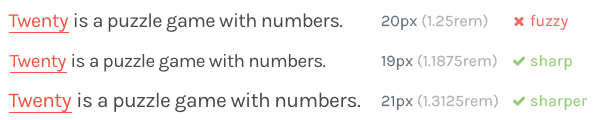
<p>But <strong>not all font sizes are equal</strong>… Considering the text of this website:</p>

<figure>
  <img alt="CSS fuzzy text" src="/images/em-fuzzy-text.png" />
  <br />
  <figcaption>1.25rem is easy to set but imperfect</figcaption>
</figure>

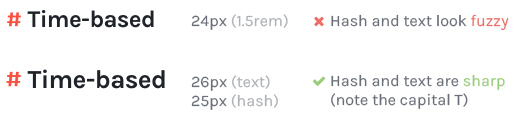
<p>Even with bigger text, the problem is present:</p>

<figure>
  <img alt="CSS fuzzy title" src="/images/em-fuzzy-title.png" />
  <br />
  <figcaption>Even a 1px difference is noticeable</figcaption>
</figure>

<h3 id="every-font-needs-its-own-specific-size">Every font needs its own specific size</h3>

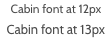
<p>Another problem with <code class="language-plaintext highlighter-rouge">em</code> arises when you want to change the <strong>font family</strong>, because every font renders differently at each size:</p>

<figure>
  <img alt="CSS Cabin font" src="/images/em-cabin-font.png" />
  <br />
  <figcaption>12px is easy to calculate but 13px looks better</figcaption>
</figure>

<h3 id="images-need-pixels">Images need pixels</h3>

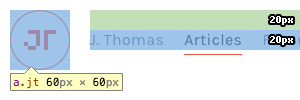
<p>An image’s <strong>dimensions</strong> are set in pixels. If you want to <em>vertically</em> align its surrounding text precisely, you need to use a <code class="language-plaintext highlighter-rouge">padding-top</code> and a <code class="language-plaintext highlighter-rouge">line-height</code> in pixels:</p>

<figure>
  <img alt="CSS image alignment" src="/images/em-image-alignment.png" />
  <br />
  <figcaption>This would require tricky calculations with em or rem</figcaption>
</figure>

<p>(My logo isn’t an image but it used to be, and they usually are anyway).</p>

<h3 id="borders-need-pixels">Borders need pixels</h3>

<p>Let’s say you want your buttons and inputs to be <code class="language-plaintext highlighter-rouge">38px</code> high. Having both equally sized allows to put them next to each other, like in <a href="http://v4-alpha.getbootstrap.com/components/input-group/">Bootstrap 4</a>:</p>

<figure>
  <img alt="em input button" src="/images/em-input-button.png" />
  <br />
  <figcaption>Nicely grouped and aligned</figcaption>
</figure>

<p>How do you that with <code class="language-plaintext highlighter-rouge">rem</code>?</p>

<figure class="highlight"><pre><code class="language-css" data-lang="css"><span class="nc">.form-control</span> <span class="p">{</span>
  <span class="nl">border</span><span class="p">:</span> <span class="m">.0625rem</span> <span class="nb">solid</span> <span class="nx">#ccc</span><span class="p">;</span>
  <span class="nl">border-radius</span><span class="p">:</span> <span class="m">.25rem</span><span class="p">;</span>
  <span class="nl">font-size</span><span class="p">:</span> <span class="m">1rem</span><span class="p">;</span>
  <span class="nl">padding</span><span class="p">:</span> <span class="m">.375rem</span> <span class="m">.75rem</span><span class="p">;</span>
<span class="p">}</span></code></pre></figure>

<p>All these calculations are based upon a font size of <code class="language-plaintext highlighter-rouge">16px</code>. Now let’s say you have to change that value, like <code class="language-plaintext highlighter-rouge">15px</code>, what happens?</p>

<figure>
  <img alt="em input button border gone" src="/images/em-input-button-border-gone.png" />
  <br />
  <figcaption>Where's my border??</figcaption>
</figure>

<p>Yep. The border is now set at <code class="language-plaintext highlighter-rouge">0.9375px</code>, and just disappears, rightfully so.</p>

<p>You would think: <em>“Why not use an inset box-shadow?”</em>? Well <code class="language-plaintext highlighter-rouge">box-shadow</code> is not the solution:</p>

<ul>
  <li>every time you want to add a shadow, you need to redefine <em>all</em> other values</li>
  <li>the shadow is not part of the box model</li>
  <li>it can only be a single colour</li>
  <li>you need 4 shadows if you want 4 different “border” colours</li>
</ul>

<h3 id="vectors-need-pixels">Vectors need pixels</h3>

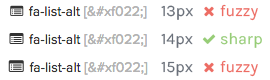
<p>Vector elements, like <strong>icon fonts</strong> need precise pixel values to render correctly.</p>

<p>The default font size for <a href="http://fortawesome.github.io/Font-Awesome/">Font Awesome</a> is <code class="language-plaintext highlighter-rouge">28px</code>. If you need smaller icons, stick to <code class="language-plaintext highlighter-rouge">14px</code>. Any other value would look terrible:</p>

<figure>
  <img alt="em Font Awesome" src="/images/em-font-awesome.png" />
  <br />
  <figcaption>Only multiples of 7 please</figcaption>
</figure>

<h3 id="browsers-zoom-properly-now">Browsers zoom properly now</h3>

<p>Browsers used to zoom in a page by simply <strong>increasing the font size</strong>, making the text bigger but keeping the layout set in pixels at its initial size. To prevent users from breaking the page when zooming in, you had to define a <strong>fluid</strong> layout, using <code class="language-plaintext highlighter-rouge">em</code> or <code class="language-plaintext highlighter-rouge">rem</code>.</p>

<p>But nowadays, browsers can simply zoom <em>any</em> layout proportionally. No need for <code class="language-plaintext highlighter-rouge">em</code> anymore.</p>

<h2 id="just-use-pixels">Just use pixels</h2>

<p>If you want sharp precise interfaces, stick to <code class="language-plaintext highlighter-rouge">px</code>:</p>

<ul>
  <li>you’ll avoid any cumbersome <strong>calculations</strong> that involve 4 decimals</li>
  <li>just by looking at a CSS rule, you’ll know exactly how it will look like because there’s no <strong>dependency</strong></li>
  <li><strong>preprocessors</strong> like Sass allow easy maintenance anyway: you can have global variables for sizes, or use mixins to define variations for your elements</li>
  <li>you’ll be able to <strong>align</strong> different <em>types</em> of elements that each require their <em>own</em> <code class="language-plaintext highlighter-rouge">font-size</code></li>
</ul>

<p>You can still use <code class="language-plaintext highlighter-rouge">em</code> for things like letter-spacing, some margins, or any property that can be applied on different font-size values. But any reason to apply <code class="language-plaintext highlighter-rouge">em</code> <em>everywhere</em> is either outdated or futile.</p>]]></content><author><name></name></author><category term="Code" /><summary type="html"><![CDATA[CSS provides several size units:]]></summary></entry><entry><title type="html">Strategy guide for the game Twenty</title><link href="https://ichad.id/strategy-guide-for-the-game-twenty.html" rel="alternate" type="text/html" title="Strategy guide for the game Twenty" /><published>2015-05-17T00:00:00+07:00</published><updated>2015-05-17T00:00:00+07:00</updated><id>https://ichad.id/strategy-guide-for-the-game-twenty</id><content type="html" xml:base="https://ichad.id/strategy-guide-for-the-game-twenty.html"><![CDATA[<figure>
  <a href="http://twenty.frenchguys.net/"><img alt="Twenty game logo" src="/images/twenty-puzzle-game.png" /></a>
</figure>

<p><a href="http://twenty.frenchguys.net/">Twenty</a> is a puzzle game with numbers.</p>

<p>The goal of the game is to reach the tile “20”. You progress my merging similar value tiles. The merge increments the tile’s value by 1. Reaching the tile “20” will make it disappear.</p>

<p>The high score consists of the number of “20” tiles you’ve managed to reach.</p>

<h2 id="twenty-and-2048">Twenty and 2048</h2>

<p>The game is reminiscent of the famous <a href="http://gabrielecirulli.github.io/2048/">2048</a> considering you progress in the game my merging same-value tiles.</p>

<p>But there are key differences:</p>

<ul>
  <li>In Twenty, merging tiles increments the value by 1 ; in 2048, the new value is doubled.</li>
  <li>In Twenty, tile colors don’t follow a pattern ; in 2048, colors follow a specific gradient according to their value.</li>
  <li>Twenty is time-based. 2048 is not.</li>
  <li>In Twenty, new tiles can have any value (provided it already appeared once). In 2048, new tiles can only be of value 2 or 4.</li>
</ul>

<h2 id="time-based">Time-based</h2>

<p>Every 10 second, 7 new tiles appear at the bottom. Their order and value is random.</p>

<p>If no other merge is possible, the new line will appear instantly.</p>

<h2 id="difficulty-factor">Difficulty factor</h2>

<p>For a game to remain interesting, it needs to provide a similar <em>experience</em> but different <em>challenge</em> every time.</p>

<p>Instead of simply speeding up the timer gradually, the difficulty comes from random <strong>connections</strong> that appear between two tiles. It means that they can only move as one, which drastically reduces their movability. You need to merge one of the connected tiles to remove all its adjacent connections.</p>

<ul>
  <li>After reaching tile “10”, only two tiles can be connected.</li>
  <li>After reaching tile “15”, up to three tiles can be connected.</li>
  <li>After reaching tile “20”, up to four tiles can be connected.</li>
</ul>

<h2 id="basic-strategy">Basic strategy</h2>

<p>Because Twenty is a time-based game, the obivous aim is to merge tiles <em>as fast as possible</em>. Which means performing swift movements with your finger across the screen.</p>

<p>(By the way, I <em>highly</em> recommended playing on your phone).</p>

<p>Any move that doesn’t result in a possible merge is wasted time. Make each move count.</p>

<p>The key aspect of the game’s strategy is that <strong>not all merges are equal</strong>. In other words, the quickest merge is not always the best option.</p>

<h3 id="build-towers">Build towers</h3>

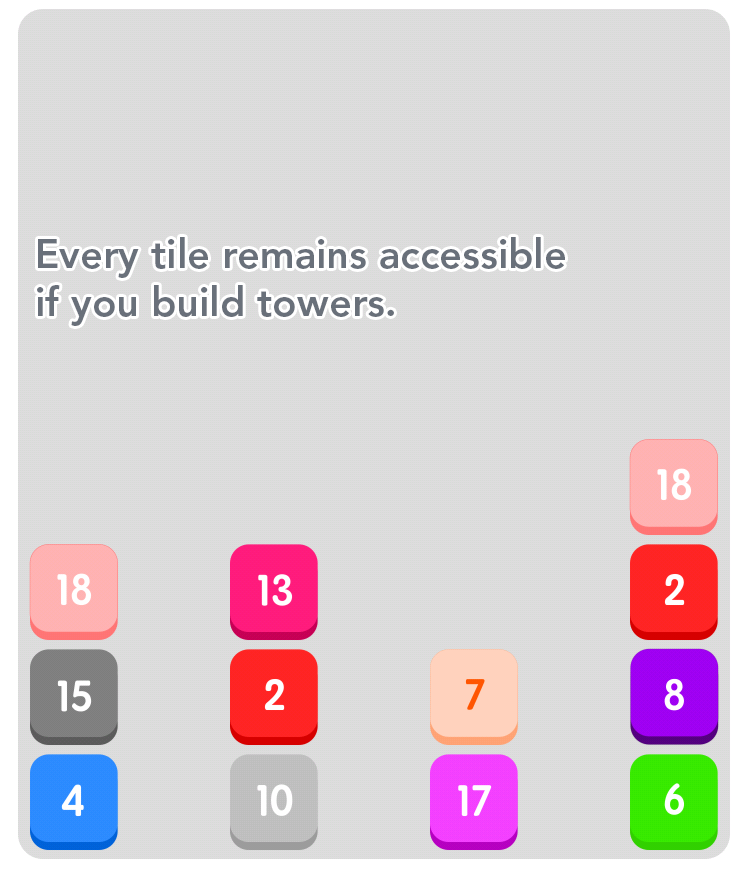
<p>The main problem you’ll face is not being able to <strong>access</strong> tile, rather than having no merge available left.</p>

<p>Keep all tiles accessible by keeping some <strong>columns empty</strong>, and avoid making lines (which is the opposite of Tetris basically.)</p>

<p><img src="/images/twenty-towers.png" alt="Twenty towers" /></p>

<h3 id="focus-on-the-lower-numbers">Focus on the lower numbers</h3>

<p>Ask yourself: how many “1” tiles does it take to get a “n” tile?</p>

<p>Let’s imagine the game only spawns “1” tiles. You’ll need 4 of them to get a “3”. You’ll need 128 of them to get a “8”.</p>

<p>Obviously, other tiles than “1” appear, and you keep all the ones you’ve already merged. But you’ll free space quicker by merging lower values.</p>

<h3 id="keep-the-tiles-ordered">Keep the tiles ordered</h3>

<p>Each tile value should be lower than the one it’s sitting on.</p>

<p>In the best case scenario, you can make towers of adjacent values:</p>

<p><img src="/images/twenty-ordered-tiles.png" alt="Ordered tiles" /></p>

<p>My merging the “10” on top, it will trigger a chain reaction and get rid of five tiles in a row.</p>

<h3 id="reorder-when-merging">Reorder when merging</h3>

<p>If a merge possible with a number located at the bottom of a column:</p>

<ul>
  <li>if it has a higher value than the one on top: merge into</li>
  <li>if lower value: drag it out</li>
</ul>

<h3 id="housekeeping">Housekeeping</h3>

<p>If at least one possible merge is left (which means the timer hasn’t reset), it can be useful to take some time to reorder the tiles and place lower numbers on top.</p>

<p>It also allows to keep one “free” tile in case a better merge is possible <em>after</em> the timer runs out.</p>

<p>(Quick tip: when the timer is about to run out, hold a tile in the “air” to prevent it from connecting with another one.)</p>

<h3 id="make-merge-sequences">Make merge sequences</h3>

<p>Try to merge the tile you’ve just “created”. For example, if merging two “7” to create a “8”, look for another “8”. Merge them and look for a “9”.</p>

<p>Doing so means you have at least one “n” tile, and you only need to find a second one.</p>

<h3 id="break-the-connections">Break the connections</h3>

<p>If it wasn’t for the existence of connected tiles, the game would be very easy: because merging tiles removes one tile from the screen, merging tiles would be a virtuous cycle where keeping an empty (and thus playable) game area allows to easily merge tiles, which empties the area, etc.</p>

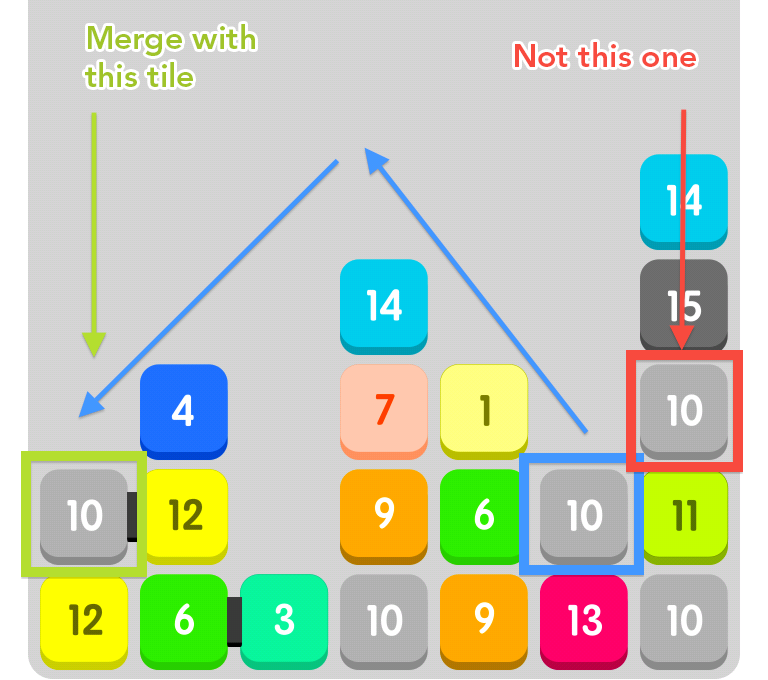
<p>So, if multiple merges possible: focus on targetting <strong>connected</strong> tiles. You’ll allow them to be moved freely, and prevent blocking the ones below.</p>

<p><img src="/images/twenty-merge.png" alt="Merging conflict" /></p>

<h3 id="use-gravity">Use gravity</h3>

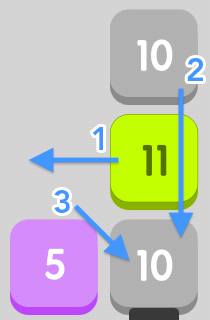
<p>If two tiles of same value are only separated vertically by another tile, move the middle tile to let the top one merge with the bottom one.</p>

<p>If you’re lucky and the middle tile was of value “n+1”, you can merge it back with the newly created tile.</p>

<p><img src="/images/twenty-gravity.png" alt="Gravity" /></p>

<h2 id="prioritize">Prioritize</h2>

<p>The difficulty increases exponentially: if during one round you only manage to perform fewer than 5 merges, you’ll suffer the consequences for following rounds as well. Keeping your board “tidy” in the early rounds (before the “10” tile) is crucial to obtaining a high score.</p>

<p>Because time is a constraint, it is difficult to focus on applying all these ideas on each move.</p>

<p>Although keeping tiles ordered is essential, it’s very hard to maintain over time. That’s why focusing on <strong>breaking the connections</strong> is a great strategy.</p>

<p>In later rounds, because the board can be completely blocked by connected tiles, the problem doesn’t come from the <em>existence</em> of merges or the <em>speed</em> required to perform them, but simply from the <strong>ability</strong> to perform them.</p>

<p>Sometimes, moving tiles to break 1 connection instead of merging 6 non-connected tiles can be considered a better move in the long run. It also helps focusing on one aspect of the game because connections are easy to spot.</p>]]></content><author><name></name></author><category term="Thoughts" /><summary type="html"><![CDATA[]]></summary></entry><entry><title type="html">A better Android “Complete action using”</title><link href="https://ichad.id/a-better-android-complete-action-using.html" rel="alternate" type="text/html" title="A better Android “Complete action using”" /><published>2015-03-21T00:00:00+07:00</published><updated>2015-03-21T00:00:00+07:00</updated><id>https://ichad.id/a-better-android-complete-action-using</id><content type="html" xml:base="https://ichad.id/a-better-android-complete-action-using.html"><![CDATA[<p>When opening a specific type of <strong>link</strong>, Android prompts you to choose between several apps. It’s the mobile equivalent of the desktop <em>“Open With…“</em>.</p>

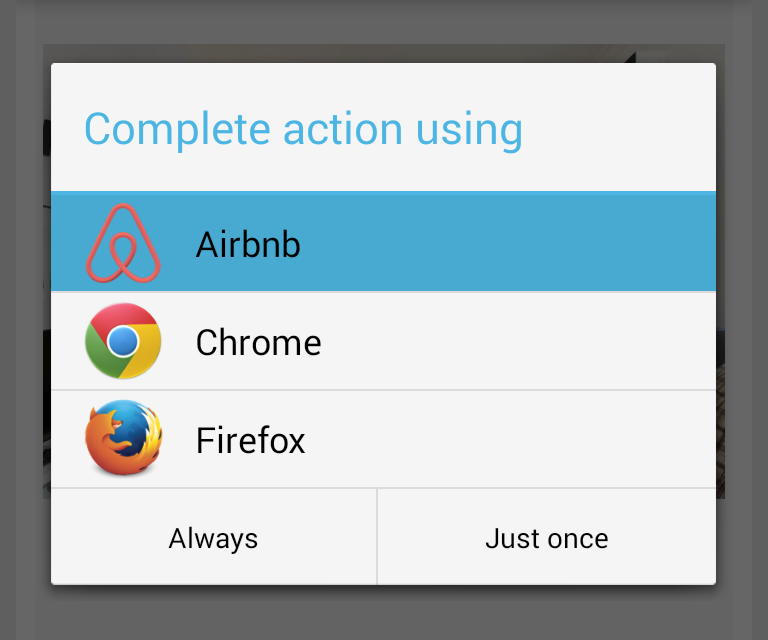
<p>For example, when tapping on a Airbnb link, this modal appears:</p>

<p><img src="/images/android-complete-action-using-default.png" alt="Android &quot;Complete action with&quot;" /></p>

<p>The key part of this modal is the bottom part, where 2 options appear:</p>

<ul>
  <li><strong>Always</strong>: subsequent taps on similar types of links will always open the selected app.<br />
The modal won’t appear again.</li>
  <li><strong>Just once</strong>: the link will only open in the selected app this time.<br />
The modal will reappear next time a similar link is opened.</li>
</ul>

<p>The <strong>problem</strong> with this approach is that <em>any</em> action requires <strong>2 taps</strong>: selecting <em>which</em> app to use and <em>how</em> subsequent taps will behave.</p>

<p>As a result, choosing the <strong>permanent</strong> behavior is <em>as easy as</em> choosing a <strong>one-time</strong> behavior. If a user chose <em>“Always”</em> by mistake, he’d have to dig deep into the phone settings to <em>undo</em> his error, which will also clear the app’s behavior regarding <em>other</em> types of links.</p>

<h3 id="a-less-error-prone-approach">A less error-prone approach</h3>

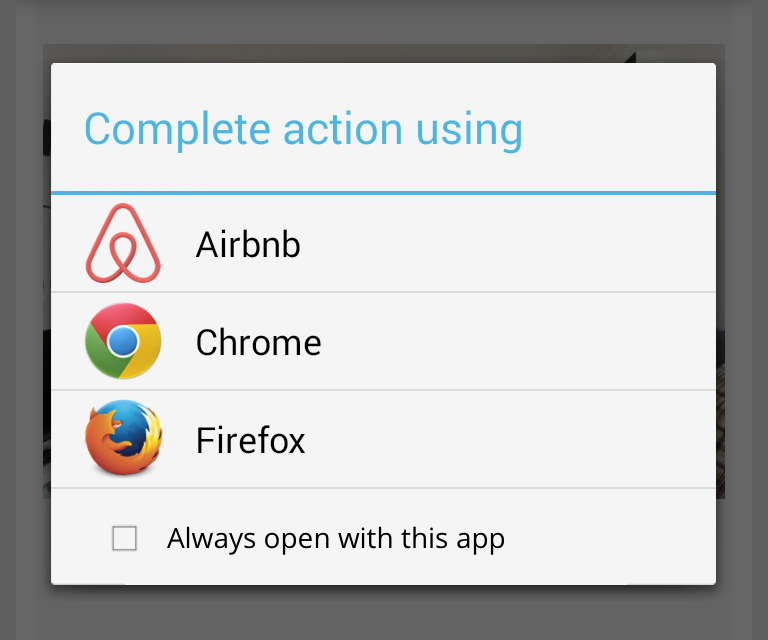
<p>To simplify the opening of a link <strong>and</strong> to prevent any permanent decision, the modal should look like this:</p>

<p><img src="/images/android-complete-action-using-better.png" alt="Better Android &quot;Complete action with&quot;" /></p>

<p>How it works:</p>

<ul>
  <li>No app is selected by default.</li>
  <li>Tapping on an app will open the link in that app.</li>
  <li>Choosing that app as the permanent choice requires 2 taps.</li>
</ul>

<p>The <strong>one-time</strong> action is quicker as it requires only a <strong>single</strong> tap.</p>

<p>Although defining the <strong>permanent</strong> action requires to tap at the bottom and <em>then</em> in the list, opting for a less straightforward approach is <strong>deliberate</strong>, as it prevents easy mistakes.</p>

<p>If a user wishes to choose an app as the default one, he’d have to <em>actively</em> decide to do so.</p>]]></content><author><name></name></author><category term="UX" /><summary type="html"><![CDATA[When opening a specific type of link, Android prompts you to choose between several apps. It’s the mobile equivalent of the desktop “Open With…“.]]></summary></entry><entry><title type="html">An alternative to infinite scroll</title><link href="https://ichad.id/an-alternative-to-infinite-scroll.html" rel="alternate" type="text/html" title="An alternative to infinite scroll" /><published>2014-11-04T00:00:00+07:00</published><updated>2014-11-04T00:00:00+07:00</updated><id>https://ichad.id/an-alternative-to-infinite-scroll</id><content type="html" xml:base="https://ichad.id/an-alternative-to-infinite-scroll.html"><![CDATA[<figure>
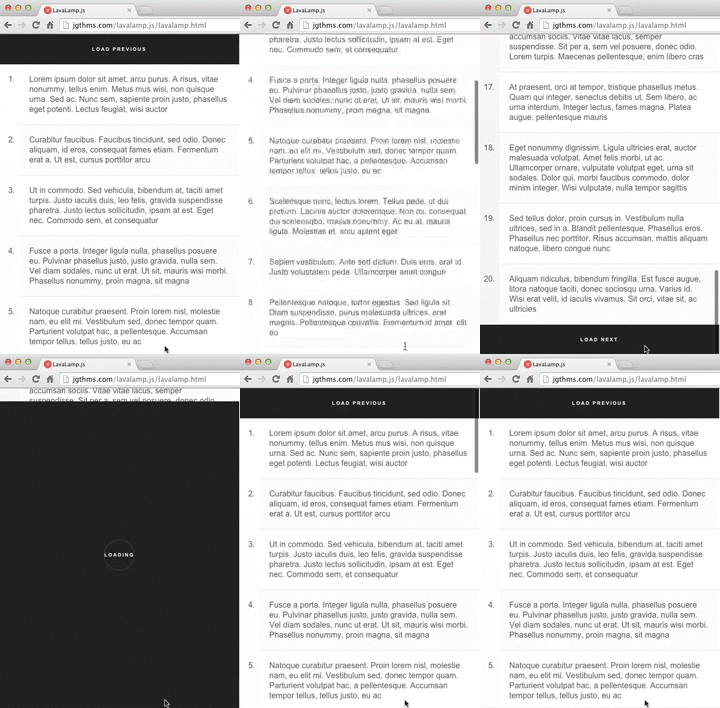
  <a href="http://jgthms.com/lavalamp.js/lavalamp.html">
    <img alt="Infinite scroll alternative" src="/images/infinite-scroll-alternative.gif" />
  </a>
  <figcaption><a href="https://github.com/jgthms/lavalamp.js">Lavalamp.js</a> demo</figcaption>
</figure>

<h2 id="to-infinity-but-not-beyond">To infinity but not beyond</h2>

<p>Whoever initially implemented infinite scrolling was probably well-intentioned. The fundamental idea is clever: <strong>accelerating</strong> the process of finding what you’re looking for by <strong>eliminating</strong> any hurdle. No need to load a whole new page, nor to take any <em>action</em> at all. The browsing experience is <strong>seamless</strong>.</p>

<p>But also <strong>endless</strong>. The flood of results can be overwhelming. The page scrolling can drastically slow down. Retrieving your previous position can be challenging. Bookmarking is almost impossible. Keeping a sense of space (and time?) is troublesome. There’s too much, too quick.</p>

<figure>
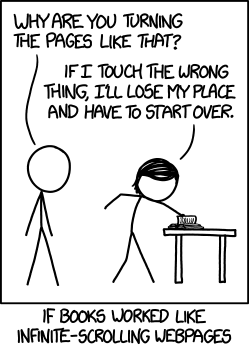
  <a href="https://xkcd.com/1309/">
    <img src="http://imgs.xkcd.com/comics/infinite_scrolling.png" alt="xkcd: Infinite Scrolling" />
  </a>
</figure>

<p>Although some of these issues can be circumvented through technical and layout tweaks, the underlying question remains to know if infinite scroll is necessary <em>at all</em>. <a href="http://danwin.com/2013/01/infinite-scroll-fail-etsy/">Etsy dropped infinite scroll</a> after making the wrong assumption that users wanted both more results per page and faster results. Probably the <strong>incessant flow</strong> of results prevented the user from taking any <strong>decision</strong> at all, and led him to forget what he was looking for, or why he started browsing the page in the first place.</p>

<h2 id="a-mobile-paradigm">A mobile paradigm</h2>

<p>The infinite scroll UX paradigm has found its way in <em>many</em> interfaces, especially on <strong>mobile</strong>. It’s probably due to users (including me) being lazy: swiping (for scrolling) is more convenient than tapping. It’s a more natural, less demanding gesture.</p>

<p>It does makes sense for <strong>feeds</strong> (Twitter, Facebook) because they only require one page, and are meant to be consumed in one direction primarily. It’s less convenient for <strong>search results</strong> though, where there’s a sub-page to be accessed, and where the uncertainty to end and probablity to alter your navigation are both higher.</p>

<p>What about a regular <strong>pagination</strong>? <em>Next</em> and <em>Previous</em> buttons are mandatory, but displaying pages on a mobile device is less of a requirement, or should at least not be interactive.</p>

<h2 id="simplifying-the-flow">Simplifying the flow</h2>

<p>Some of infinite scrolling’s assumptions are correct, but need to be reduced and/or altered to fit a mobile device’s needs:</p>

<ul>
  <li><strong>speed up</strong> the browsing experience by remaining on the same page</li>
  <li>unburden the DOM from <strong>past</strong> results</li>
  <li>maintain the possibility to navigate to the <strong>previous</strong> page</li>
  <li>provide the user with a sense of <strong>completion</strong> by displaying a milestone (the <em>Load next</em> button)</li>
  <li>keep the user focused by requiring his <strong>action</strong> to navigate</li>
  <li>design a <strong>seamless</strong> experience</li>
</ul>

<p>Demo: <a href="http://jgthms.com/lavalamp.js/lavalamp.html">http://jgthms.com/lavalamp.js/lavalamp.html</a></p>

<p>When tapping the “Next” button, an animated element covers up the viewport, remains fixed on top (while the new content is loaded and the page scrolls back up), before it shrinks to match the “Previous” button and then disappear.</p>

<p>Source: <a href="https://github.com/jgthms/lavalamp.js">https://github.com/jgthms/lavalamp.js</a></p>]]></content><author><name></name></author><category term="UX" /><summary type="html"><![CDATA[Lavalamp.js demo]]></summary></entry><entry><title type="html">Chrome’s black scrollbar bug</title><link href="https://ichad.id/chrome-black-scrollbar-bug.html" rel="alternate" type="text/html" title="Chrome’s black scrollbar bug" /><published>2014-06-04T00:00:00+07:00</published><updated>2014-06-04T00:00:00+07:00</updated><id>https://ichad.id/chrome-black-scrollbar-bug</id><content type="html" xml:base="https://ichad.id/chrome-black-scrollbar-bug.html"><![CDATA[<p>Have you ever encountered a black scrollbar like the one below?</p>

<p><img src="/images/chrome-black-scrollbar.png" alt="Chrome black scrollbar" /></p>

<p>If so, you might wonder <em>where</em> it comes from. For the last couple of months, I’ve been experiencing this issue on a regular basis, without actually understanding <em>why</em> it occured, so it was difficult to find a workaround.</p>

<p>In my case, it only happened in Chrome on my Macbook Air. Although refreshing the page fixed the problem, I wanted to find out what triggered it in the first place.</p>

<p>And then it occured to me.</p>

<p>I’ve been using a Logitech mouse since February. At times, when working with a colleague, I would unplug my mouse, grab my laptop, and sit at his desk. That’s when the black scrollbar would appear.</p>

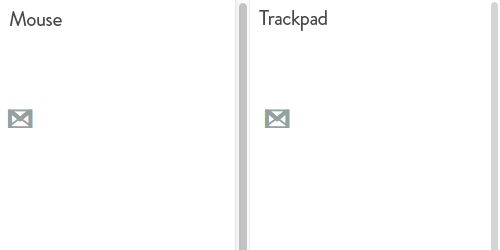
<figure>
  <img alt="Scrollbar with mouse or trackpad" src="/images/scrollbar-with-mouse-or-trackpad.gif" /><br />
  <figcaption>The viewport will be 15px less wide with the mouse plugged in</figcaption>
</figure>

<ul>
  <li>When using a <strong>mouse</strong>, Chrome renders a fixed scrollbar that’s 15 pixels wide.</li>
  <li>When using the <strong>trackpad</strong>, Chrome uses an “overlay” scrollbar, that doesn’t take up any space, and only displays the scroll handle when interacting with it.</li>
</ul>

<p>Unplugging the mouse while visiting a page in Chrome would remove the fixed scrollbar and replace it with a black rectangle.</p>]]></content><author><name></name></author><category term="UI" /><summary type="html"><![CDATA[Have you ever encountered a black scrollbar like the one below?]]></summary></entry><entry><title type="html">Order and hierarchy in menus</title><link href="https://ichad.id/order-and-hierarchy-in-menus.html" rel="alternate" type="text/html" title="Order and hierarchy in menus" /><published>2014-05-19T00:00:00+07:00</published><updated>2014-05-19T00:00:00+07:00</updated><id>https://ichad.id/order-and-hierarchy-in-menus</id><content type="html" xml:base="https://ichad.id/order-and-hierarchy-in-menus.html"><![CDATA[<p>While using Chrome on Android, it occured to me its menu carried a behavior that’s recurrent in many interfaces.</p>

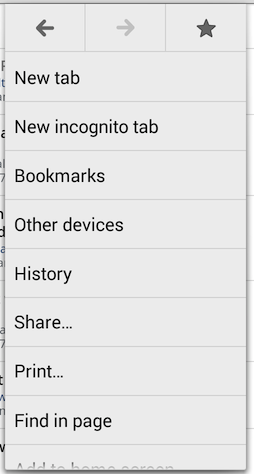
<figure>
  <img alt="Chrome Android first screen" src="/images/chrome-android-first-screen.png" /><br />
  <figcaption>Chrome Android's first menu screen</figcaption>
</figure>

<p>Apart from the <code class="language-plaintext highlighter-rouge">Back</code>, <code class="language-plaintext highlighter-rouge">Forward</code>, and <code class="language-plaintext highlighter-rouge">Favourite</code> buttons, all the other items appear identical. But apart from their visual similarity, their respective <strong>position</strong> determines their importance ; a higher position denotes a more significant role (especially when using the useful one-swipe-only interaction).</p>

<p>It’s therefore natural to find the ‘New tab’ button in 1st position. But the others buttons’ relative position?</p>

<ul>
  <li><code class="language-plaintext highlighter-rouge">New incognito tab</code> is seldom used but is 2nd, though its position is probably due to its resemblance with <code class="language-plaintext highlighter-rouge">New tab</code></li>
  <li>I never used <code class="language-plaintext highlighter-rouge">Other devices</code> but it’s 4th</li>
  <li>Same applies to <code class="language-plaintext highlighter-rouge">Print</code> (7th), for which I can’t see any reasonable use case (printing a web page <em>and</em> via a phone?)</li>
  <li>The more useful <code class="language-plaintext highlighter-rouge">Request desktop site</code> (considering the poor state of dedicated mobile websites) is buried third to last</li>
  <li><code class="language-plaintext highlighter-rouge">Settings</code> are second to last</li>
</ul>

<p>Re-arranging the <strong>order</strong> of these buttons is a good step towards a more usable interface.</p>

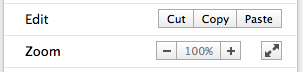
<p>Going further in providing a quicker and better experience, I wonder why all buttons provide the <strong>same interactive area</strong> while they don’t carry the same importance. I assume it’s due to the less error-prone touch interface. But it makes sense on desktop, especially for people not well acquainted with keyboard shortcuts:</p>

<p><img src="/images/chrome-desktop-menu-buttons.png" alt="Chrome Desktop menu buttons" /></p>

<p>On a side note, hiding the menu <em>while</em> interacting with <code class="language-plaintext highlighter-rouge">Back</code> and <code class="language-plaintext highlighter-rouge">Forward</code> is bad UX, considering they’re often used repeatedly in a row.</p>]]></content><author><name></name></author><category term="UX" /><summary type="html"><![CDATA[While using Chrome on Android, it occured to me its menu carried a behavior that’s recurrent in many interfaces.]]></summary></entry></feed>